
How to Make an Out-of-Office Video Reply
Sep 18, 2024An out-of-office video reply is a short video, under a minute, that your email auto-responder links to instead of sending a paragraph of text. You record it once, host it on a simple page, and point the auto-reply at that page. It tells people you are away, when you are back, and who to contact while you are gone.
It is also the easiest video you will ever record. Nobody is deciding whether to buy from you while they read an auto-reply. They already know you, they emailed you first, and they want one piece of information. That makes it a very forgiving place to press record for the first time.
What do you actually say in an out-of-office video?
Four facts, in this order. Write them on a sticky note and stick it under the lens. Do not write a script, because a script is what makes people sound like they are reading one.
- Who you are and that you are away. Your name, and that this is an automatic reply.
- When you are back. A real date, not "shortly".
- What to do if it cannot wait. A colleague's name and address, or an instruction. Chris's own reply asks people to put URGENT in the subject line so it gets seen.
- Thank them. One line. They took the time to write.
Leave out the rest. Where you are going, why, an apology for being away, and anything that sounds like a pitch. Somebody chasing an invoice does not want to be sold to by a recording.
How do you put a video in an out-of-office auto-reply?
You do not embed the file. Email does not play video reliably across Gmail, Outlook and every phone in between, so an embedded file is the one thing you can count on breaking. The working pattern has three parts.
- Record the video. One take. If you fluff a word, keep going, it reads as human.
- Put it on one page of your site, on its own. Nothing else on the page. The video, the dates, and the urgent contact in text underneath, so the information survives even if the video does not load.
- Set the auto-reply to point at it. A short line of text, a still frame of you with a play button drawn on it, and the link. The image is the hook, the text link is what actually gets clicked when images are blocked.
Here is the real one, live on this site, so you can see the whole shape before you build yours.
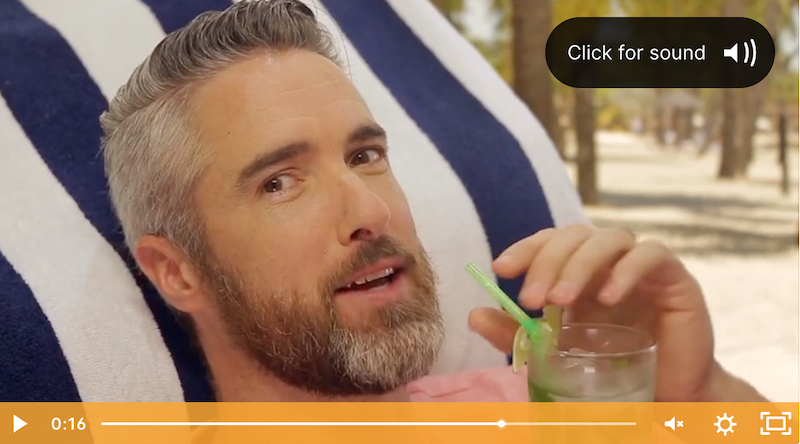
Watch Chris's out-of-office video reply
Why is this a good first video to record?
What stops video happening is almost never the camera. It is whether the person ever presses record. Equipment is one of four parts and it is the easy one. The message, the delivery on camera, and actually getting the thing made are the harder three, and the last of those is where it usually stalls.
An out-of-office reply removes every excuse at once. The audience already knows you. There is nothing to sell. The content is four facts you could recite in your sleep. And it has a deadline, because you are going away on a particular day whether the video exists or not. That combination is rare, which is what makes it a sensible place to begin if you have never recorded anything.
If you want the wider case for where video sits in a business before you start filming, the guide on why video matters for your business is the place to start.
How long should it be, and do you need a studio?
Twenty to forty seconds. You are delivering four facts, and past about forty seconds people leave before the part they needed.
You need no studio for this one. A phone or a webcam, a window in front of you rather than behind you, and a room where the door is shut. Buying gear before you have made a single video is the wrong order. Kit bought ahead of the habit tends to sit unused, which is the pattern Ridge sees most often. Make this one on what you already own.
What do you do with it once you are back?
Keep the page. Next time you go away you change two dates and it works again. That is the quiet argument for it: one recording, reused every time you go anywhere.
The bigger return is what it proves. You have now recorded, hosted and sent a video, which is the exact process behind every other one you might make. The natural next step is a personalised video reply sent to one person, then using video in email more generally. When you want ideas for what else to point a camera at, there are 50 business videos worth making.
Common questions about out-of-office video replies
What is an out-of-office video reply?
An out-of-office video reply is a short video, under a minute, that your email auto-responder links to instead of sending a paragraph of text. It tells people you are away, when you are back, and who to contact while you are gone.
Can you put a video inside an out-of-office auto-reply?
Not as a playable file. Email does not play video reliably, so the auto-reply carries a still image with a play button and a link to a page that holds the video. The reader clicks once and it plays there.
How long should an out-of-office video be?
Twenty to forty seconds is plenty. You are delivering four facts: you are away, when you are back, who to contact, and thank you. Anything longer and people leave before the part they actually needed.
Do you need a studio to record an out-of-office video?
No. A phone or a webcam, a window for light and a quiet room will do it. Buying equipment for this one video is the wrong order. The harder parts of video are the message, the delivery and actually getting it made, and this video is deliberately easy on all three.
If pressing record is the part that never happens
That is the problem worth solving, and it is not a camera problem. Ridge Films builds the studio so the technical side stops being a reason, then coaches the message and the delivery so the videos actually get made. Book a call and we will work out what is really in the way.

